

Most sellers already know what good B2B sales intelligence looks like. The problem is how long it takes to pull it together. You’re researching an account across four tabs, cross-referencing CRM notes, trying to figure out what they actually care about right now, and often doing all of it before a call that’s in 20 minutes.
RevvyAI makes sales research fast and easy. It’s a conversational AI interface built directly into the 6sense Sales Intelligence platform, and it lets you ask plain-language questions about any account or contact and get immediate, actionable answers. No pivot tables, no manual research, no hunting through dashboards. Just ask, get an answer, and act.
Consider the prompts below a starting point for your new sales playbook.
Why RevvyAI is more powerful than AI chatbots you’re already using
A general-purpose AI can tell you a lot about a company. What it can’t tell you is that three contacts from their marketing team visited your pricing page last week, that the account has been researching “intent platform” and “pipeline management” for the past 30 days, or that they’re currently in the Consideration stage of the buying journey.
That context is what separates a good conversation from a great one. RevvyAI taps into 6sense’s proprietary intent data, engagement signals, and account intelligence: information that isn’t indexed by search engines, isn’t accessible through off-the-shelf AI tools, and can’t be replicated by asking ChatGPT or any other general-purpose chat interface the same question.
When RevvyAI tells you how to approach an account, it’s not working from a company’s public LinkedIn profile. It’s working from a real-time picture of that account’s research behavior, buying stage, web activity, and CRM history — synthesized instantly, in plain language, on demand. That’s the context that makes smarter selling possible.
Here’s how to get the most out of it.
B2B sales intelligence is one prompt away
RevvyAI runs as a browser overlay that lives directly in your workflow — on LinkedIn, inside your CRM, on a prospect’s website. Wherever you’re already working, your B2B sales intelligence is a question away.
- Ask it about an account and it surfaces intent signals, buying stage, and web visit activity.
- Ask it about a contact and it pulls engagement history, CRM activity, and recent news.
- Ask it what to do next and it gives you a specific recommendation — not a dashboard to interpret, but an actual answer.
It works on accounts already in your CRM and ones that aren’t. It works on contacts you’ve been nurturing for months and ones you’ve never spoken to. And it follows a simple framework that experienced sellers will recognize immediately:
- What should I do? — Strategy, messaging, next steps
- What’s happening? — Signals, news, engagement, intent
- What does it mean? — Context, interpretation, buying stage
 Prompts to get you started
6sense users can get started by trying one of these prompts on a company website, or a company or contact LinkedIn profile page.
Account research
- “Account overview”
- “Summarize intent, engagement, and CRM activity”
- “Are they showing signs of being in-market?”
Conversation prep
- “Have any [role] from this company been on our website recently?”
- “What opportunities are currently open?”
- “Relevant news and updates”
Strategy and outreach
- “How should I approach this account right now?”
- “What should my outreach focus on?”
- “Write an introduction message for LinkedIn”
Contact intelligence
- “Are they showing interest?”
- “Are they a good fit?”
“What angle would resonate most with this contact based on recent updates?”
Four plays to run before your next call
Play 1: Build your approach before you pick up the phone
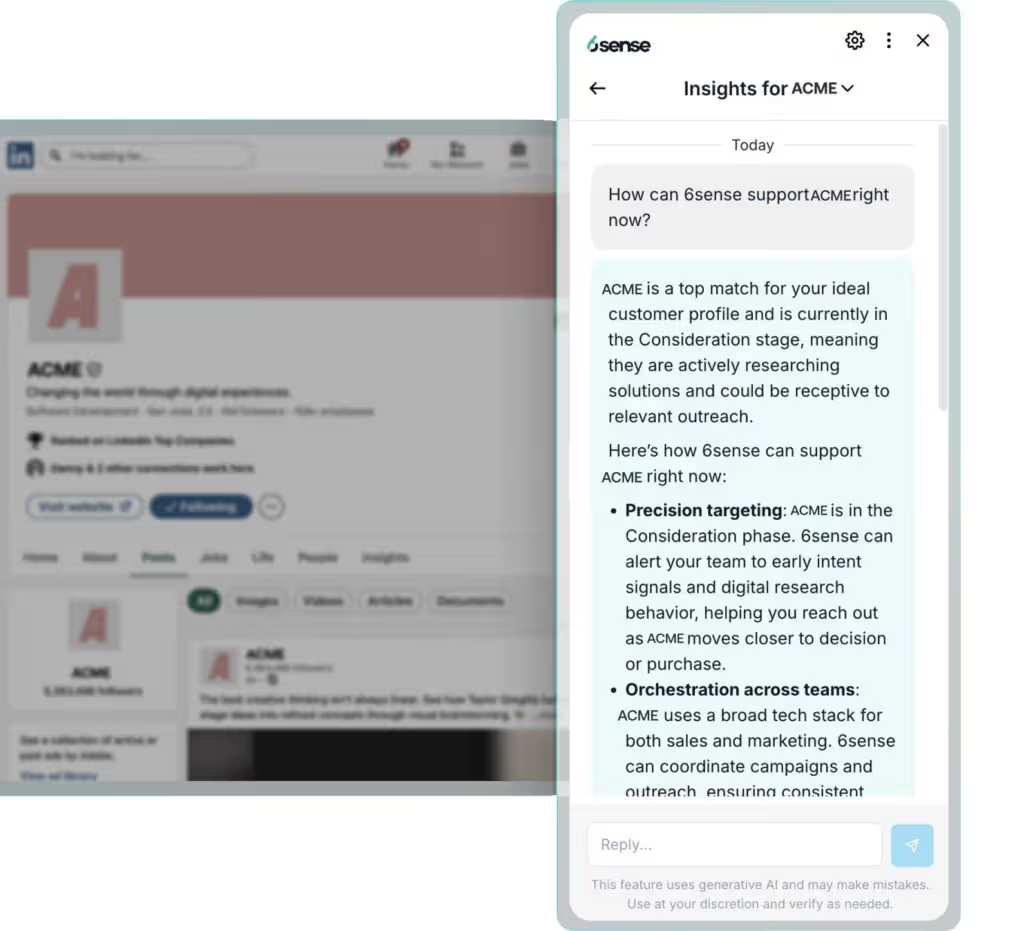
The ask: “How should I approach this account right now?” or “How can [your company] support this company right now?”
The answer: This is the play that ties everything together. RevvyAI synthesizes account signals, buying stage, recent news, and your company context to recommend a specific outreach strategy — which angles to lead with, which contacts to prioritize, and what your message should focus on. It’ll even draft outreach for you: a LinkedIn intro message, a tailored one-to-two sentence pitch, or a full email.
One important note: the more context you give RevvyAI about what you sell, the sharper its recommendations get. Try framing your prompts like: “As a seller at [company], how should I approach this account?” or “Based on our product offering in [brief description], where are the best opportunities here?”
Play 2: Get up to speed on any account in minutes
The ask: “Summarize this account based on recent activity and engagement.”
The answer: RevvyAI returns a full account snapshot: what they do, what they’re researching, where they are in the buying journey, and what’s been happening in your CRM.
You can go deeper from there — ask about
- open opportunities
- recent news
- competitor keyword searches
- which product or feature pages their team has been visiting
Feel free to get extremely specific: “Create an executive summary of this account based on intent activity, CRM notes and activities, campaigns, support requests, and competitor keyword searches.”
That’s the kind of briefing that used to take 30 minutes to build. Now it takes 30 seconds.
Play 3: Find out who’s been paying attention
The ask: “Have any [role or team] from this company been on our website recently?”
The answer: This is where RevvyAI turns anonymous B2B sales intelligence into something you can actually act on. It surfaces specific contacts who have visited your site, which pages they hit, and how often — so you can walk into a conversation knowing exactly who’s been doing their homework, and on what.
If you see an Events & Influencer Marketing Manager who’s visited your event pages three times in the last 30 days, that’s not a cold outreach. That’s a warm one with a very specific opening.
Play 4: Turn their research into your pitch
The ask: “Please summarize keyword activity for this account.”
The answer: RevvyAI returns a ranked list of the topics and keywords this account has been actively researching — along with how many searches each topic has generated. That’s a window into what’s keeping their leadership team up at night, handed to you before the first conversation.
Follow-up prompts make it even more tactical: “What do these keyword searches tell us about their current priorities?” or “What does this signal about where they are in the buying journey?” You’re not guessing at their pain anymore. You’re reading it.
The contact layer
Everything above applies to contacts, not just accounts.
You can ask
to qualify a contact you’ve never spoken to. You can ask whether they’re worth pursuing, or pull a summary of their engagement history. You can even ask it to identify what tools and platforms they’ve likely used based on their career experience — useful context for tailoring your message to where they’re coming from.
For contacts already in your CRM, you can ask when they last engaged, what they’ve been looking at, and what your next move should be. It’s the kind of relationship context that usually lives in a rep’s head — now it’s available to everyone on the team.
Get started
RevvyAI for Sales is available for all 6sense Sales Intelligence customers, at no additional charge. Open it on any account page, start with one of the prompts above, and follow the thread.
Not yet a 6sense customer? Book a demo to see RevvyAI working in your data.